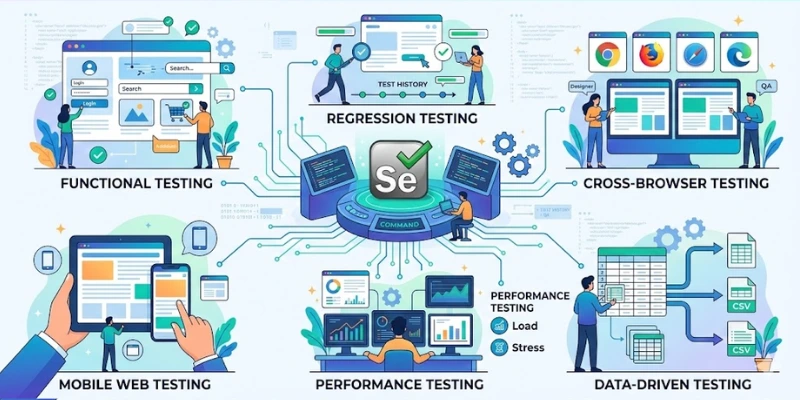
Many beginners entering software testing feel confused about what Selenium actually tests. Some think it only clicks buttons automatically, while others assume it replaces manual testing completely. The reality sits somewhere in between. When learners start hands-on practice through Selenium Training in Salem, they begin to see how automation supports different types of testing in real projects. Selenium is not just a tool; it’s a framework that helps testers validate web applications in multiple practical ways.
Functional testing
Functional testing is one of the most common uses of Selenium. It checks whether each feature of a web application works as expected. For example, login forms, search bars, payment gateways, and registration pages can be automated to verify correct behavior. Selenium scripts simulate real user actions and compare actual results with expected results. This reduces repetitive manual work and ensures core features function properly after every code update.
Regression testing
When developers modify code, existing features may break without notice. Regression testing ensures that previously working functionalities still perform correctly after changes. Selenium helps automate these repeated checks. Instead of manually testing every feature again, automated scripts run test cases quickly and consistently. This saves time and improves release confidence. Regression testing becomes especially valuable in agile environments where updates happen frequently.
Selenium supports more than simple automation. It covers functional validation, repeated regression checks, browser compatibility, quick smoke tests, data-driven scenarios, and business-level acceptance testing. Learning how each testing type works prepares candidates for interviews and real-time project work. Automation skills continue to grow in demand as companies aim for faster releases and better quality. Career paths in testing become stronger when practical exposure expands through focused learning environments like Selenium Training in Trichy, where automation knowledge connects directly to industry needs.
Cross-browser testing
Web applications must work smoothly across different browsers like Chrome, Firefox, and Edge. Cross-browser testing verifies that layouts, buttons, and interactions behave consistently. Selenium supports multiple browsers, making it easier to test compatibility. This helps avoid user complaints related to display or functionality issues on specific browsers. For testers, understanding browser drivers and configuration becomes part of practical automation skills.
Smoke testing
Smoke testing checks whether the basic functionality of an application works before deeper testing begins. It acts like a quick health check. Selenium can automate key workflows such as launching the application, logging in, and navigating to main pages. If these core features fail, there’s no need to proceed with detailed testing. Smoke tests are often run after every new build to confirm system stability.
Data-driven testing
Some applications need testing with multiple input values. For example, login fields may require different username and password combinations. Data-driven testing allows testers to run the same script with different datasets. Selenium supports this by integrating with tools like Excel or external data files. This method improves coverage without rewriting scripts repeatedly. Many learners strengthen these automation techniques alongside Software Testing Courses in Erode, where structured practice builds real-world confidence.
Integration testing
Selenium can assist in validating how different modules of a web application work together. While it mainly focuses on the user interface, it still plays a role in checking whether front-end interactions correctly connect with backend processes. For instance, submitting a form should correctly update the database and display confirmation messages. Automation scripts help verify such flows, ensuring different components communicate properly.
Acceptance testing
Acceptance testing ensures that the application meets business requirements before release. Selenium supports automated acceptance test scenarios that reflect real user journeys. These tests often align with client expectations and project documentation. In growing job markets, professionals who understand these testing types through Software Testing Course in Trichy often find roles where automation knowledge directly supports delivery timelines and quality standards.
Also Check: Overview Of Selenium